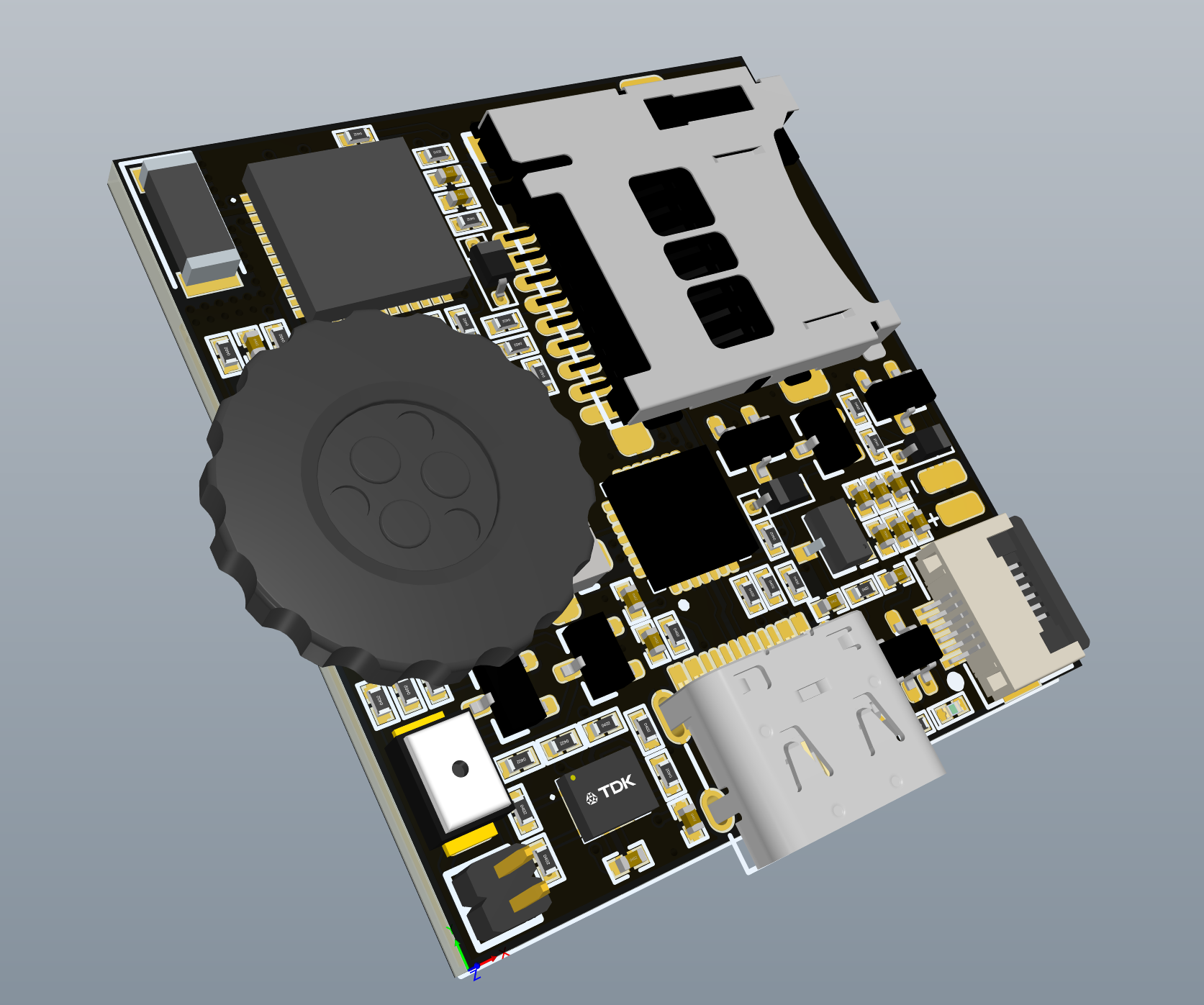
<?xml version="1.0" encoding="utf-8"?><feed xmlns="http://www.w3.org/2005/Atom" ><generator uri="https://jekyllrb.com/" version="3.10.0">Jekyll</generator><link href="https://alfredzhang98.github.io/feed.xml" rel="self" type="application/atom+xml" /><link href="https://alfredzhang98.github.io/" rel="alternate" type="text/html" /><updated>2026-09-13T11:27:40+00:00</updated><id>https://alfredzhang98.github.io/feed.xml</id><title type="html">Home</title><author><name>Qingyu Zhang</name><email>qingyu.zhang.23@ucl.ac.uk</email></author><entry><title type="html">NeoPeak: Smart Terminal on ESP32 with LVGL (alfredzhang98/NeoPeak)</title><link href="https://alfredzhang98.github.io/neopeak-project/" rel="alternate" type="text/html" title="NeoPeak: Smart Terminal on ESP32 with LVGL (alfredzhang98/NeoPeak)" /><published>2026-01-14T00:00:00+00:00</published><updated>2026-01-14T00:00:00+00:00</updated><id>https://alfredzhang98.github.io/neopeak-project</id><content type="html" xml:base="https://alfredzhang98.github.io/neopeak-project/"><![CDATA[<p>I’m excited to announce the completion of NeoPeak, a compact smart terminal built on ESP32. This project ports the original Peak project to ESP32 ecosystem, integrating LVGL graphics library and modular firmware architecture.</p>

<p><img src="/images/projects/pcbs/neopeak.png" alt="NeoPeak" /></p>

<ul>
  <li>Repository: <a href="https://github.com/alfredzhang98/NeoPeak">https://github.com/alfredzhang98/NeoPeak</a></li>
</ul>

<h2 id="project-overview">Project Overview</h2>

<p>NeoPeak is an ultra-compact intelligent terminal featuring:</p>
<ul>
  <li><strong>LVGL Graphics Framework</strong> (v8.1) - Embedded GUI library</li>
  <li><strong>MVC Architecture</strong> - Modular firmware design</li>
  <li><strong>Message Framework</strong> - Pub/Sub event system</li>
  <li><strong>WiFi/Bluetooth</strong> - ESP32 wireless capabilities</li>
  <li><strong>3D Engine</strong> (in development) - 3D model visualization</li>
  <li><strong>Display</strong>: 240×240 16-bit color TFT, 60fps target</li>
</ul>

<h2 id="key-technical-highlights">Key Technical Highlights</h2>

<h3 id="hardware-platform-esp32-pico-v3-02">Hardware Platform: ESP32-Pico-V3-02</h3>

<p>MCU selection requires:</p>
<ul>
  <li>Main frequency &gt; 150MHz</li>
  <li>RAM ≥ 200KB (112KB for LVGL buffer)</li>
  <li>SPI speed ≥ 50Mbps (for 60fps refresh)</li>
</ul>

<p>ESP32-Pico-V3-02 chosen for:</p>
<ul>
  <li>Dual-core, built-in WiFi/Bluetooth</li>
  <li>Arduino ecosystem friendly</li>
  <li>Cost and availability</li>
</ul>

<h3 id="firmware-architecture">Firmware Architecture</h3>

<p>Three-layer design:</p>
<ul>
  <li><strong>HAL</strong>: Low-level drivers, sensors, MCU peripherals</li>
  <li><strong>Framework</strong>: LVGL display, page lifecycle, message system</li>
  <li><strong>Application</strong>: UI pages and business logic</li>
</ul>

<h3 id="display-integration">Display Integration</h3>

<ul>
  <li>Driver: ST7789 (240×240, 16-bit) via TFT_eSPI</li>
  <li>SPI clock: &gt; 50MHz (IOMUX required for maximum speed)</li>
  <li>LVGL buffer: 112KB, dynamically allocated</li>
  <li>Memory: ESP32’s fragmented 300KB dataRAM requires careful allocation order</li>
</ul>

<h3 id="page-scheduling">Page Scheduling</h3>

<p>Inspired by iOS ViewController, implements structured page lifecycle:</p>
<ul>
  <li><strong>onViewLoad</strong>: Initialize views</li>
  <li><strong>onViewDidAppear</strong>: Transition animations</li>
  <li><strong>onViewWillDisappear/onViewDidDisappear</strong>: Cleanup</li>
  <li><strong>onViewDidUnload</strong>: Resource cleanup</li>
</ul>

<h3 id="message-framework">Message Framework</h3>

<p>Pub/Sub system for sensor data and events:</p>
<ul>
  <li>HAL publishes sensor events (GPS, IMU, barometer)</li>
  <li>Data processors subscribe and compute metrics</li>
  <li>UI pages subscribe to processed data</li>
  <li>Reactive updates on event changes</li>
</ul>

<h3 id="key-implementation-details">Key Implementation Details</h3>

<ul>
  <li><strong>LVGL Porting</strong>: Display/File/Input port implementations</li>
  <li><strong>SPI Config</strong>: HSPI MISO pin remap to GPIO26 (avoid GPIO12 flash boot conflict)</li>
  <li><strong>Memory</strong>: Dynamic allocation for display buffer, careful initialization order</li>
  <li><strong>File System</strong>: <code class="language-plaintext highlighter-rouge">lv_fs_drv_t</code> must be static/global (not stack-allocated)</li>
</ul>

<h2 id="references">References</h2>

<ul>
  <li><a href="https://github.com/peng-zhihui/Peak">Peak</a> - Original hardware and firmware</li>
  <li><a href="https://github.com/FASTSHIFT/X-Track">X-Track</a> - Framework architecture and LVGL integration</li>
  <li><a href="https://github.com/lvgl/lvgl">LVGL</a> - Graphics library</li>
  <li><a href="https://github.com/Bodmer/TFT_eSPI">TFT_eSPI</a> - SPI display driver</li>
  <li><a href="https://docs.espressif.com/">ESP32 Docs</a> - Microcontroller resources</li>
</ul>

<p>Check out the repository and contribute!</p>]]></content><author><name>Qingyu Zhang</name><email>qingyu.zhang.23@ucl.ac.uk</email></author><category term="Hardware" /><category term="AIOT" /><category term="GUI" /><summary type="html"><![CDATA[I’m excited to announce the completion of NeoPeak, a compact smart terminal built on ESP32. This project ports the original Peak project to ESP32 ecosystem, integrating LVGL graphics library and modular firmware architecture.]]></summary></entry><entry><title type="html">PyTorch Study Repo: Quick Tour and Index (alfredzhang98/PyTorch_study)</title><link href="https://alfredzhang98.github.io/study-pytorch/" rel="alternate" type="text/html" title="PyTorch Study Repo: Quick Tour and Index (alfredzhang98/PyTorch_study)" /><published>2025-10-28T00:00:00+00:00</published><updated>2025-10-28T00:00:00+00:00</updated><id>https://alfredzhang98.github.io/study-pytorch</id><content type="html" xml:base="https://alfredzhang98.github.io/study-pytorch/"><![CDATA[<p>This post summarizes my learning repository “PyTorch_study” based on notes and examples from the book/course “PyTorch 深度学习实战”, so I can quickly review it later.</p>

<ul>
  <li>Repo links:
    <ul>
      <li>GitHub: <a href="https://github.com/alfredzhang98/PyTorch_study">https://github.com/alfredzhang98/PyTorch_study</a></li>
      <li>README: <a href="https://github.com/alfredzhang98/PyTorch_study/blob/main/Readme.md">https://github.com/alfredzhang98/PyTorch_study/blob/main/Readme.md</a></li>
    </ul>
  </li>
</ul>

<h2 id="repository-structure">Repository structure</h2>

<p>As described in the README, the repo is organized into three parts:</p>

<p>1) Basic: PyTorch prerequisites and fundamentals (NumPy basics, Tensor basics and advanced usage)
2) Training: Building and training neural networks with PyTorch (autograd, nn module, optim module, and the end-to-end training loop)
3) Application: Practical projects (e.g., computer vision, LSTM motion prediction)</p>

<p>Currently, the Basic, Training and Application parts are complete.</p>

<h2 id="basic">Basic</h2>

<ul>
  <li>Environment sanity check
    <ul>
      <li>00_test.ipynb: <a href="https://github.com/alfredzhang98/PyTorch_study/blob/main/Basic/00_test.ipynb">https://github.com/alfredzhang98/PyTorch_study/blob/main/Basic/00_test.ipynb</a>
        <ul>
          <li>Print PyTorch/CUDA versions and GPU info; quick CPU vs GPU timing.</li>
        </ul>
      </li>
    </ul>
  </li>
  <li>NumPy basics
    <ul>
      <li>01_numpy.ipynb: <a href="https://github.com/alfredzhang98/PyTorch_study/blob/main/Basic/01_numpy.ipynb">https://github.com/alfredzhang98/PyTorch_study/blob/main/Basic/01_numpy.ipynb</a>
        <ul>
          <li>Array creation; shape/ndim; reshape; arange/linspace; axis-wise reductions; simple plotting.</li>
        </ul>
      </li>
    </ul>
  </li>
  <li>NumPy for images
    <ul>
      <li>02_numpy_pics.ipynb: <a href="https://github.com/alfredzhang98/PyTorch_study/blob/main/Basic/02_numpy_pics.ipynb">https://github.com/alfredzhang98/PyTorch_study/blob/main/Basic/02_numpy_pics.ipynb</a>
        <ul>
          <li>PIL/OpenCV interop; channel split/merge; argsort, top-k, and mask generation mini tasks.</li>
        </ul>
      </li>
    </ul>
  </li>
  <li>Tensor basics and advanced
    <ul>
      <li>03_tensor.ipynb: <a href="https://github.com/alfredzhang98/PyTorch_study/blob/main/Basic/03_tensor.ipynb">https://github.com/alfredzhang98/PyTorch_study/blob/main/Basic/03_tensor.ipynb</a>
        <ul>
          <li>Scalar/vector/matrix concepts; core Tensor operations.</li>
        </ul>
      </li>
      <li>04_tensor_advanced.ipynb: <a href="https://github.com/alfredzhang98/PyTorch_study/blob/main/Basic/04_tensor_advanced.ipynb">https://github.com/alfredzhang98/PyTorch_study/blob/main/Basic/04_tensor_advanced.ipynb</a>
        <ul>
          <li>Indexing/index_select; unbind; chunk/split; and more practical snippets.</li>
        </ul>
      </li>
    </ul>
  </li>
</ul>

<h2 id="training">Training</h2>

<ul>
  <li>Data pipeline
    <ul>
      <li>05_dataset_dataload.ipynb: <a href="https://github.com/alfredzhang98/PyTorch_study/blob/main/Training/05_dataset_dataload.ipynb">https://github.com/alfredzhang98/PyTorch_study/blob/main/Training/05_dataset_dataload.ipynb</a>
        <ul>
          <li>Dataset/DataLoader; MNIST example; transform parameters explained.</li>
        </ul>
      </li>
    </ul>
  </li>
  <li>Vision preprocessing
    <ul>
      <li>06_torchvision.ipynb: <a href="https://github.com/alfredzhang98/PyTorch_study/blob/main/Training/06_torchvision.ipynb">https://github.com/alfredzhang98/PyTorch_study/blob/main/Training/06_torchvision.ipynb</a>
        <ul>
          <li>torchvision.transforms: Resize/CenterCrop/RandomCrop/FiveCrop/Flip/Normalize/RandomErasing; PIL ↔ Tensor conversions.</li>
        </ul>
      </li>
    </ul>
  </li>
  <li>Pretrained models and fine-tuning
    <ul>
      <li>07_models.ipynb: <a href="https://github.com/alfredzhang98/PyTorch_study/blob/main/Training/07_models.ipynb">https://github.com/alfredzhang98/PyTorch_study/blob/main/Training/07_models.ipynb</a>
        <ul>
          <li>torchvision.models (e.g., GoogLeNet); transfer learning; utils.make_grid/save_image visualization.</li>
        </ul>
      </li>
    </ul>
  </li>
  <li>Convolution and visualization
    <ul>
      <li>08_conv01.ipynb: <a href="https://github.com/alfredzhang98/PyTorch_study/blob/main/Training/08_conv01.ipynb">https://github.com/alfredzhang98/PyTorch_study/blob/main/Training/08_conv01.ipynb</a>
        <ul>
          <li>Conv2d parameters (kernel/stride/padding/dilation/groups/bias); manual convolution; dilated conv; channel-wise pseudo-color visualization.</li>
        </ul>
      </li>
    </ul>
  </li>
  <li>Loss functions
    <ul>
      <li>10_loss.ipynb: <a href="https://github.com/alfredzhang98/PyTorch_study/blob/main/Training/10_loss.ipynb">https://github.com/alfredzhang98/PyTorch_study/blob/main/Training/10_loss.ipynb</a>
        <ul>
          <li>Squared loss, MSE/MAE recap and derivation snippets.</li>
        </ul>
      </li>
    </ul>
  </li>
  <li>Autograd and gradients
    <ul>
      <li>11_grad.ipynb: <a href="https://github.com/alfredzhang98/PyTorch_study/blob/main/Training/11_grad.ipynb">https://github.com/alfredzhang98/PyTorch_study/blob/main/Training/11_grad.ipynb</a>
        <ul>
          <li>Feedforward networks; derivatives/partials and an intuition for autograd.</li>
        </ul>
      </li>
    </ul>
  </li>
  <li>Optimization methods
    <ul>
      <li>12_optimise.ipynb: <a href="https://github.com/alfredzhang98/PyTorch_study/blob/main/Training/12_optimise.ipynb">https://github.com/alfredzhang98/PyTorch_study/blob/main/Training/12_optimise.ipynb</a>
        <ul>
          <li>BGD/SGD/Mini-batch; Momentum, RMSProp, Adam; NumPy-only demos (shuffle indices, batch splits, parameter updates); common pitfalls and references.</li>
        </ul>
      </li>
    </ul>
  </li>
  <li>Training visualization
    <ul>
      <li>14_visual.ipynb: <a href="https://github.com/alfredzhang98/PyTorch_study/blob/main/Training/14_visual.ipynb">https://github.com/alfredzhang98/PyTorch_study/blob/main/Training/14_visual.ipynb</a>
        <ul>
          <li>wandb/tensorboard usage; SummaryWriter for logging loss; suggested log directory structure and commands.</li>
        </ul>
      </li>
    </ul>
  </li>
  <li>Speeding up training and distributed
    <ul>
      <li>15_train_fast.ipynb: <a href="https://github.com/alfredzhang98/PyTorch_study/blob/main/Training/15_train_fast.ipynb">https://github.com/alfredzhang98/PyTorch_study/blob/main/Training/15_train_fast.ipynb</a>
        <ul>
          <li>Single-/multi-GPU and multi-node setups; nccl/gloo backends; init_process_group/env vars; enumerating devices; DDP best practices.</li>
        </ul>
      </li>
    </ul>
  </li>
</ul>

<h2 id="application">Application</h2>

<ul>
  <li>Image Classification
    <ul>
      <li>16_image_classification_basic.ipynb: <a href="https://github.com/alfredzhang98/PyTorch_study/blob/main/Application/16_image_classification_basic.ipynb">https://github.com/alfredzhang98/PyTorch_study/blob/main/Application/16_image_classification_basic.ipynb</a>
        <ul>
          <li>Basics of image classification tasks.</li>
        </ul>
      </li>
      <li>17_image_cllssification_code.ipynb: <a href="https://github.com/alfredzhang98/PyTorch_study/blob/main/Application/17_image_cllssification_code.ipynb">https://github.com/alfredzhang98/PyTorch_study/blob/main/Application/17_image_cllssification_code.ipynb</a>
        <ul>
          <li>Practical code examples for image classification.</li>
        </ul>
      </li>
    </ul>
  </li>
  <li>Image Segmentation
    <ul>
      <li>18_image_segmentation_basic.ipynb: <a href="https://github.com/alfredzhang98/PyTorch_study/blob/main/Application/18_image_segmentation_basic.ipynb">https://github.com/alfredzhang98/PyTorch_study/blob/main/Application/18_image_segmentation_basic.ipynb</a>
        <ul>
          <li>Introduction to image segmentation concepts.</li>
        </ul>
      </li>
      <li>19_image_segmentation_code.ipynb: <a href="https://github.com/alfredzhang98/PyTorch_study/blob/main/Application/19_image_segmentation_code.ipynb">https://github.com/alfredzhang98/PyTorch_study/blob/main/Application/19_image_segmentation_code.ipynb</a>
        <ul>
          <li>Implementation of segmentation models (UNet etc.) and training scripts.</li>
          <li>19_image_segmentation_train.py: Training script for image segmentation.</li>
          <li>19_image_segmentation_val.py: Validation script for image segmentation.</li>
        </ul>
      </li>
    </ul>
  </li>
  <li>NLP Basics
    <ul>
      <li>20_nlp_basic.ipynb: <a href="https://github.com/alfredzhang98/PyTorch_study/blob/main/Application/20_nlp_basic.ipynb">https://github.com/alfredzhang98/PyTorch_study/blob/main/Application/20_nlp_basic.ipynb</a>
        <ul>
          <li>Natural Language Processing fundamentals.</li>
        </ul>
      </li>
      <li>21_nlp_attention.ipynb: <a href="https://github.com/alfredzhang98/PyTorch_study/blob/main/Application/21_nlp_attention.ipynb">https://github.com/alfredzhang98/PyTorch_study/blob/main/Application/21_nlp_attention.ipynb</a>
        <ul>
          <li>Understanding Attention mechanisms.</li>
        </ul>
      </li>
    </ul>
  </li>
  <li>Advanced NLP Applications
    <ul>
      <li>22_lstm_emotion.ipynb: <a href="https://github.com/alfredzhang98/PyTorch_study/blob/main/Application/22_lstm_emotion.ipynb">https://github.com/alfredzhang98/PyTorch_study/blob/main/Application/22_lstm_emotion.ipynb</a>
        <ul>
          <li>Emotion classification using LSTM.</li>
          <li>22_lstm_emotion.py: Python script version of the LSTM emotion classification.</li>
        </ul>
      </li>
      <li>23_bert_emotion.ipynb: <a href="https://github.com/alfredzhang98/PyTorch_study/blob/main/Application/23_bert_emotion.ipynb">https://github.com/alfredzhang98/PyTorch_study/blob/main/Application/23_bert_emotion.ipynb</a>
        <ul>
          <li>Emotion classification using BERT.</li>
        </ul>
      </li>
      <li>24_bart_abstract.ipynb: <a href="https://github.com/alfredzhang98/PyTorch_study/blob/main/Application/24_bart_abstract.ipynb">https://github.com/alfredzhang98/PyTorch_study/blob/main/Application/24_bart_abstract.ipynb</a>
        <ul>
          <li>Text summarization/abstract generation using BART.</li>
          <li>24_bart_main.py: Main execution script for BART summarization.</li>
          <li>24_bert_test.py: Test script for BERT/BART models.</li>
        </ul>
      </li>
    </ul>
  </li>
</ul>

<h2 id="how-to-use">How to use</h2>

<ul>
  <li>Browse online: click the GitHub links above to open each .ipynb.</li>
  <li>Run locally: create a fresh Conda env; install PyTorch, torchvision, numpy, matplotlib, Pillow, etc.; then open in Jupyter or VS Code.</li>
</ul>

<h2 id="next-steps">Next steps</h2>

<p>The learning phase is now complete. The next major update will focus on implementing modern architectures from scratch:</p>

<ul>
  <li><strong>Hand-rolled Implementations</strong>: Implementing Transformer, ViT (Vision Transformer), and other key frameworks from scratch to understand their inner workings.</li>
  <li><strong>Minimal Testing</strong>: Performing minimal testing to verify the correctness of these implementations.</li>
  <li>Keep refining training/tuning/visualization patterns into reusable templates.</li>
</ul>

<p>If you’re also learning PyTorch, feel free to star and discuss!</p>]]></content><author><name>Qingyu Zhang</name><email>qingyu.zhang.23@ucl.ac.uk</email></author><category term="Study" /><category term="ML" /><summary type="html"><![CDATA[This post summarizes my learning repository “PyTorch_study” based on notes and examples from the book/course “PyTorch 深度学习实战”, so I can quickly review it later.]]></summary></entry><entry><title type="html">Claim: This site and key changes versus the original template</title><link href="https://alfredzhang98.github.io/claim-and-changes/" rel="alternate" type="text/html" title="Claim: This site and key changes versus the original template" /><published>2025-09-10T00:00:00+00:00</published><updated>2025-09-10T00:00:00+00:00</updated><id>https://alfredzhang98.github.io/claim-and-changes</id><content type="html" xml:base="https://alfredzhang98.github.io/claim-and-changes/"><![CDATA[<p>This post documents, in English, the changes made on top of AcademicPages/Minimal Mistakes, the rationale, and compatibility measures. It also credits the original work.</p>

<p>Acknowledgment &amp; Reference</p>
<ul>
  <li>The site is based on AcademicPages (MIT). Repository: <a href="https://github.com/academicpages/academicpages.github.io">link</a></li>
  <li>The theme is Minimal Mistakes (MIT). Many thanks to the authors and community.</li>
</ul>

<p>Why these changes</p>
<ul>
  <li>Better project presentation for research: ordering, date ranges, ongoing highlights, and readable funding.</li>
  <li>Bilingual browsing (EN/中文) while preserving the correct author name across translations.</li>
  <li>Layout stability across very short and very long pages; avoid footer “floating” and translation UI layout shifts.</li>
</ul>

<p>Key changes (features and UX)</p>
<ul>
  <li>Projects index and cards
    <ul>
      <li>Sorting: primary by front matter <code class="language-plaintext highlighter-rouge">order</code> (ascending), then by date (descending).</li>
      <li>Ongoing detection based on start/end (supports <code class="language-plaintext highlighter-rouge">present/now</code>); subtle green glow on ongoing cards.</li>
      <li>Media area fixed at 5:3; SVG covers use contain (no crop, full view).</li>
      <li>Tighter preview text and spacing.</li>
      <li>Date range normalized as “YYYY.MM — Until now/End time”.</li>
    </ul>
  </li>
  <li>Funding rendering
    <ul>
      <li>Funding shown as non-wrapping chips on cards and project pages.</li>
      <li>On cards, show up to two chips; overflow summarized as “+N”, with a tooltip listing the rest.</li>
    </ul>
  </li>
  <li>Publications UX
    <ul>
      <li>Citation lines standardized (IEEE-like) with a copy-to-clipboard button.</li>
      <li>Small spacing/presentation refinements; no noisy “read more” by default.</li>
    </ul>
  </li>
  <li>Content authoring
    <ul>
      <li>PhD project: concise overview and research thrusts; links to the project website and transfer report; normalized dates/tags/cover.</li>
      <li>RA (insole) project: summary written; contributions and future work clarified; images added; paper link included; metadata normalized.</li>
      <li>RA (stimulator) project: limited to confirmed facts (stimulation, wireless charging, BLE); contributions summarized; PCB image included.</li>
    </ul>
  </li>
  <li>Language switching and Chinese fit
    <ul>
      <li>EN / 中文 switch at top-right (Google Translate underneath); choice persisted via localStorage.</li>
      <li>Tag “RA” mapped to the Chinese label “研究助理”.</li>
      <li>Author name enforced: “Qingyu Zhang” ↔ “张清宇”; auto-fixes common mistranslations (e.g., “张庆余”, “Qinyu Zhang”).</li>
      <li>
        <table>
          <tbody>
            <tr>
              <td>The switch labels are protected from translation and auto-reset to “EN</td>
              <td>中文”.</td>
            </tr>
          </tbody>
        </table>
      </li>
      <li>A MutationObserver catches late DOM changes from the translator to keep labels/names correct.</li>
    </ul>
  </li>
  <li>Layout and stability
    <ul>
      <li>Force-hide Google Translate banner/iframes to prevent layout shifts.</li>
      <li>Footer reworked to a flex-based sticky layout:
        <ul>
          <li>When content is short, the footer sticks to the bottom.</li>
          <li>When content is long, it follows naturally after content.</li>
          <li>No absolute positioning; avoids “floating in the middle”.</li>
        </ul>
      </li>
      <li>CV page: stays centered and at a sensible width even with <code class="language-plaintext highlighter-rouge">author_profile: false</code>; the PDF viewer has a fallback link.</li>
    </ul>
  </li>
</ul>

<p>Compatibility and fallbacks</p>
<ul>
  <li>Language switching applies run-time text corrections only; it does not modify source Markdown.</li>
  <li>If embedded PDF is blocked, the CV page provides an “Open in new tab” link.</li>
  <li>Sticky footer uses <code class="language-plaintext highlighter-rouge">body{display:flex;min-height:100vh;flex-direction:column}</code> and <code class="language-plaintext highlighter-rouge">#main{flex:1}</code>; works with and without the sidebar.</li>
</ul>

<p>Key files (selected)</p>
<ul>
  <li>Pages and layouts:
    <ul>
      <li><code class="language-plaintext highlighter-rouge">_pages/projects.html</code> (projects index, ordering/filtering, funding on cards)</li>
      <li><code class="language-plaintext highlighter-rouge">_layouts/cv-layout.html</code> (CV layout with centered title and content area)</li>
      <li><code class="language-plaintext highlighter-rouge">_layouts/single.html</code>, <code class="language-plaintext highlighter-rouge">_layouts/archive.html</code> (based on Minimal Mistakes structure)</li>
    </ul>
  </li>
  <li>Styles (Sass):
    <ul>
      <li><code class="language-plaintext highlighter-rouge">_sass/layout/_custom_overrides.scss</code> (project cards, funding chips, PDF viewer, sticky-footer structure)</li>
      <li><code class="language-plaintext highlighter-rouge">_sass/layout/_footer.scss</code> (flex-based footer; no floats)</li>
      <li><code class="language-plaintext highlighter-rouge">_sass/layout/_navigation.scss</code> (language switch styling and interaction)</li>
    </ul>
  </li>
  <li>Scripts:
    <ul>
      <li><code class="language-plaintext highlighter-rouge">assets/js/lang-switch.js</code> (load translator, hide banner, switch logic, name correction, tag mapping, delayed fixes)</li>
      <li><code class="language-plaintext highlighter-rouge">_includes/scripts.html</code> (script includes)</li>
    </ul>
  </li>
</ul>

<p>Development &amp; deployment</p>
<ul>
  <li>Docker files are provided for quick local preview (Docker Desktop + docker compose).</li>
  <li>Ruby/Jekyll workflows also remain viable, consistent with AcademicPages.</li>
</ul>

<p>Licensing &amp; attribution</p>
<ul>
  <li>MIT licenses from AcademicPages and Minimal Mistakes are preserved, along with acknowledgments.</li>
  <li>This document is an incremental changelog over the original template to help future maintainers.</li>
</ul>

<p>Notes to readers</p>
<ul>
  <li>If you see translation-induced issues on specific pages, please open an issue with page URL and browser details.</li>
</ul>

<p>This post publicly claims authorship for the current site implementation and summarizes deltas from the original template.</p>]]></content><author><name>Qingyu Zhang</name><email>qingyu.zhang.23@ucl.ac.uk</email></author><category term="Changelog" /><summary type="html"><![CDATA[This post documents, in English, the changes made on top of AcademicPages/Minimal Mistakes, the rationale, and compatibility measures. It also credits the original work.]]></summary></entry></feed>